 4.5 Metadata
The metadata elements are roughly based on the IMS metadata model. You can find more information about the IMS metadata model at http://www.imsglobal.org/metadata/index.cfm. If you would like to use another metadata standard see section eLML XML Schemas.

 |
Description: The element <metadata> is one of the sub-elements of the <lesson> element. It contains the elements <organisation>, <prerequisities>, <keywords>, <technical>, <lessonInfo> and <rights>. The metadata part of a lessons contains additional information about the lesson. This might help a tutor who needs to compose a course out of different lesson and wants to know more about a specific lesson. |
The element <metadata> occurs once within the <lesson> element.
Attribute(s):
none
 |
Description: The element <organisation> is the first sub-element of the metadata element. It allows to add information about the organisational hierarchy in which the current lesson is created. |
The element <organisation> occurs once within the element <metadata>.
Attribute(s):
| Name: | Use: | Value: |
| level | required | The attribute level allows to define within which level this lesson is created. The levels available for selection can be defined in the config.xsd file. Using the unchanged config.xsd the values Basic, Intermediate and Advanced can be selected. |
| module | required | The attribute module allows to define within which module this lesson is created. The modules available for selection can be defined in the config.xsd file. Using the unchanged config.xsd the values DC, SM, DM, SY, PR, AN, SD and CS can be selected. |
<organisation level="Basic" module="DC">
<creationPosition>
<posNumber>1</posNumber>
</creationPosition>
</organisation>
or
<organisation level="Basic" module="DC">
<creationPosition>
<previous>Concept_Mod</previous>
<following>DataCompress</following>
</creationPosition>
</organisation>
Element <creationPosition>
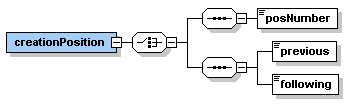 |
Description: The element <creationPosition> is the sub-element of the <organisation> element. It can contain either the element <posNumber> or the two elements <previous> and <following>. The element <creationPosition> is used to define the position of a lesson in a series of lessons. This can be defined by a position number (e.g. 5 if the lesson is the fifth lesson of a series of lessons) or by naming the previous and the following lesson in a series of lessons. |
The element <creationPosition> occurs once within the <organisation> element.
Attribute(s):
none
Element <posNumber>
 |
Description: The element <posNumber> is a sub-element of the <creationPosition> element. It can contain a number specifying the place of the lesson within a series of lessons (e.g. 5 if the lesson is the fifth lesson in a series of lessons). |
The element <posNumber> occurs zero or once within the <creationPosition> element.
Attribute(s):
none
Element <previous>
 |
Description: The element <previous> is a sub-element of the <creationPosition> element. It can contain a lesson label specified in the config.xsd file. The element <previous> defines the previous lesson of the current lesson in a series of lessons. |
The element <previous> occurs zero or once within the <creationPosition> element.
Attribute(s):
none
Element <following>
 |
Description: The element <following> is a sub-element of the <creationPosition> element. It can contain a lesson label specified in the config.xsd file. The element <following> defines the following lesson of the current lesson in a series of lessons. |
The element <following> occurs zero or once within the <creationPosition> element.
Attribute(s):
none
 |
Description: The element <prerequisites> is the second sub-element of the metadata element. It allows to add information about the prerequisites needed to successfully work through the current lesson. It contains one or many elements <preReqItem>. Typically, other lessons are specified as prerequisites for a lesson. However, it is also possible to make more general statements about needed prerequisites. |
The element <prerequisites> occurs once within the element <metadata>.
Attribute(s):
none
XML Example:
<prerequisites>
<preReqItem label="none" priority="High">General knowlegde about data modelling is needed.</preReqItem>
<preReqItem label="DiscrSpatVar" priority="Low"></preReqItem>
</prerequisites>
Element <preReqItem>
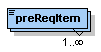 |
Description: The element <preReqItem> is the sub-element of the <prerequisites> element. It can contain simple text informing about needed prerequisites. |
The element <preRequItem> occurs at least once or as many times as needed within the element <prerequisites>.
Attribute(s):
| Name: | Use: | Value: |
| label | required | The attribute label allows to define the label of lesson which is needed as prerequisite to be able to work through the current lesson successfully. The lesson labels available can be defined in the config.xsd file. As the attribute label is required, none needs to be selected if a general statement is written into the element preReqItem. |
| priority | optional | The attribute priority allows to define how important it is to have the prerequisite specified. Values available are Low, Medium and High. |
 |
Description: The element <keywords> is the third sub-element of the metadata element. It allows to add keywords which specify the current lesson. This keywords shall help tutors who need to create a course out of a couple of different lessons to know what is the content of a lesson. |
The element <keywords> occurs once within the element <metadata>.
Attribute(s):
none
XML Example:
<keywords>
<keywordItem>Database Management Systems</keywordItem>
<keywordItem>Advantages and Disadvantages</keywordItem>
<keywordItem>Three-Layer-Architecture</keywordItem>
<keywordItem>Applications of DMBS</keywordItem>
</keywords>
Element <keywordItem>
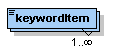 |
Description: The element <keywordItem> is the sub-element of the <keywords> element. It can contain keywords as simple text. |
The element <keywordItem> occurs at least once or as many times as needed within the element <keywords>.
Attribute(s):
none
 |
Description: The element <technical> is the fourth sub-element of the metadata element. It allows to specify what technical prerequisites are needed to work through the current lesson. Technical requirements can be a special Browser, Operating System, PlugIn, Software, etc. |
The element <technical> occurs once within the element <metadata>.
Attribute(s):
none
XML Example:
<technical>
<technicalRequirement>
<type>PlugIn</type>
<name>Macromedia Flash</name>
<minimumVersion>5.0</minimumVersion>
<downloadURL>http://www.macromedia.com/shockwave/download.cgi?P1=ShockwaveFlash</downloadURL>
<installationRemarks>Find more information about the PlugIn and hints for the installation on the macromedia website - http://www.macromedia.com/shockwave/download.cgi?P1=ShockwaveFlash</installationRemarks>
</technicalRequirement>
</technical>
Element <technicalRequirement>
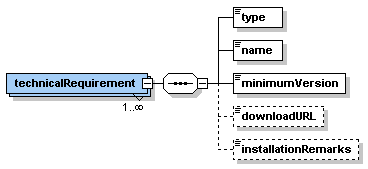 |
Description: The element <technicalRequirement> is the sub-element of the <technical> element. It contains the elements <type>, <name>, <minimumVersion> and optional <downloadURL> and <installationRemarks>. These elements contain the information about a specific technical requirement. |
The element <technicalRequirement> occurs at least once or as many times as needed within the element <technical>.
Attribute(s):
none
Element <type>
 |
Description: The element <type> is the first sub-element of the <technicalRequirement> element. It specifies the type of the requirement. Allowed are the values PlugIn, Software, Browser and OS (operating system). |
The element <type> occurs once within the element <technicalRequirement>.
Attribute(s):
none
Element <name>
 |
Description: The element <name> is the second sub-element of the <technicalRequirement> element. It contains the name of the PlugIn, the software, etc. |
The element <name> occurs once within the element <technicalRequirement>.
Attribute(s):
none
Element <minimumVersion>
 |
Description: The element <minimumVersion> is the third sub-element of the <technicalRequirement> element. It contains the version of the in the elements <type> and <name> specified PlugIn, Software, etc. as simple text. |
The element <minimumVersion> occurs once within the element <technicalRequirement>.
Attribute(s):
none
Element <downloadURL>
 |
Description: The element <downloadURL> is an optional sub-element of the <technicalRequirement> element. It contains the URL from where the specified technical requirement can be downloaded. |
The element <downloadURL> occurs zero or once within the element <technicalRequirement>.
Attribute(s):
none
Element <installationRemarks>
 |
Description: The element <installationRemarks> is an optional sub-element of the <technicalRequirement> element. It contains any additional information that is needed to install or maintain a specific plugIn, software, etc. |
The element <installationRemarks> occurs zero or once within the element <technicalRequirement>.
Attribute(s):
none
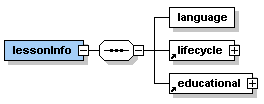 |
Description: The element <lessonInfo> is the fifth sub-element of the metadata element. It allows to add general information about the current lesson. Its three sub-elements are <language>, <lifecycle> and <educational>. Each of them are described below. |
The element <lessonInfo> occurs once within the element <metadata>.
Attribute(s):
none
XML Example:
<lessonInfo>
<language language="en" derived="no" originalLanguage="en"/>
<lifecycle>
<version creationDate="2003-05-31" modificationDate="2004-01-28">2</version>
<contribute>
<person responsible="Overall" name="Susanne Bleisch" email="s.bleisch@fhbb.ch" institute="FHBB" departement="VGI">Concept and content of the lesson.</person>
<person responsible="Specials" name="Joel Fisler" email="fisler@geo.unizh.ch" institute="UNIZH" departement="GIUZ">Flash animations, support</person>
</contribute>
<commentsNextVersion>This is the first version. A future version could include more specific information...</commentsNextVersion>
</lifecycle>
<educational>
<difficulty>Medium</difficulty>
<typicalLearningTime>
<time>2 hours</time>
<description>Time derived from first field tests with students in Feburary 2004</description>
</typicalLearningTime>
</educational>
</lessonInfo>
Element <language>
 |
Description: The element <language> is the first sub-element of the <lessonInfo> element. It contains information about the language(s) of the current lesson as attributes. |
The element <language> occurs once within the element <lessonInfo>.
Attribute(s):
| Name: | Use: | Value: |
| language | required | The attribute language allows to define the language of the current lesson. Using the default config.xsd file the values en, de, fr and it are available. This values can be changed in the config.xsd file. |
| derived | required | The attribute derived can contain the values yes or no depending if the lesson is written in the original language (no) or derived/translated from the original lesson language (yes). |
| originalLanguage | optional | The attribute originalLanguage allows to define the language of the original lesson. This is used when the attribute derived is set to yes. |
Element <lifecycle>
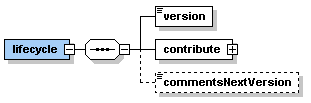 |
Description: The element <lifecycle> is the second sub-element of the <lessonInfo> element. It contains the elements <version>, <contribute> and <commentsNextVersion>. This element allows to add information about the lifecycle of the current lesson. |
The element <lifecycle> occurs once within the element <lessonInfo>.
Attribute(s):
none
Element <version>
 |
Description: The element <version> is the first sub-element of the <lifecycle> element. It contains the version number of the current lesson (e.g. 1.0, 1.1, 1.5 or 2.0). |
The element <version> occurs once within the element <lifecycle>.
Attribute(s):
| Name: | Use: | Value: |
| creationDate | required | The attribute creationDate allows to specify the date of creation of the current lesson. For example, if the lesson was created on 31 March 2004 then the attribute would contain the value 2004-03-31. |
| modificationDate | optional | The attribute modificationDate allows to specify the date of modification of the current lesson. This attribute is updated with every modification of the lesson. For example, if the lesson was last updated on 5 April 2004 then the attribute would contain the value 2004-04-05. |
Element <contribute>
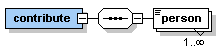 |
Description: The element <contribute> is the second sub-element of the <lifecycle> element. It contains one or as many as needed elements <person>. |
The element <contribute> occurs once within the element <lifecycle>.
Attribute(s):
none
Element <person>
 |
Description: The element <person> is the sub-element of the <contribute> element. It contains all information about one contributor to the current lesson. Most information is saved in the attributes but the element may contain simple text with additional information. |
The element <person> occurs once or as many times as needed within the element <contribute>.
Attribute(s):
| Name: | Use: | Value: |
| responsible | required | The attribute responsible allows to specify what the contributor has done for the current lesson. Available values are Overall, Concept, Content, Specials (e.g. Flash-Animations, etc.), Translation and Revision. |
| name | required | The attribute name allows to specify the name of the contributor. |
| required | The attribute email allows to specify the email address of the contributor. | |
| institute | required | The attribute institute allows to specify the institute shortcut
of the contributor. The shortcuts can be defined in the config.xsd
file. department required The attribute department allows to specify the department shortcut of the contributor. The shortcuts can be defined in the config.xsd file. |
Element <commentsNextVersion>
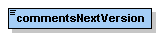 |
Description: The element <commentsNextVersion> is an optional sub-element of the <lifecycle> element. It contains simple text describing what should be changed/added in a next version of this lesson. This allows a lesson author to finish a lesson but nevertheless to add some additional remarks about what is not yet perfect in this version. |
The element <commentsNextVersion> occurs zero or once within the element <lifecycle>.
Attribute(s):
none
Element <educational>
 |
Description: The element <educational> is the third sub-element of the <lessonInfo> element. It contains the elements <difficulty> and <typicalLearningTime>. |
The element <educational> occurs once within the element <lessonInfo>.
Attribute(s):
none
Element <difficulty>
 |
Description: The element <difficulty> is an optional sub-element of the <educational> element. It allows to specify the difficulty of the content of the current lesson. Available values are Low, Medium and High. |
The element <difficulty> occurs zero or once within the element <educational>.
Attribute(s):
none
Element <typicalLearningTime>
 |
Description: The element <typicalLearningTime> is the second sub-element of the <educational> element. It contains information about the learning time of the current lesson. |
The element <typicalLearningTime> occurs once within the element <educational>.
Attribute(s):
none
Element <time>
 |
Description: The element <time> is a sub-element of the <typicalLearningTime> element. It allows to specify the average time a student will need to work through the current lesson (e.g. 2 hours). |
The element <time> occurs once within the element <typicalLearningTime>.
Attribute(s):
none
Element <description>
 |
Description: The element <description> is an optional sub-element of the <typicalLearningTime> element. It allows to specify how the value in the element <time> was obtained (e.g. through student field tests). |
The element <description> occurs zero or once within the element <typicalLearningTime>.
Attribute(s):
none
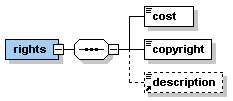 |
Description: The element <rights> is the sixth sub-element of the metadata element. It allows to add information about the rights of the current lesson. Its three sub-elements are <cost>, <copyright> and <description>. |
The element <rights> occurs once within the element <metadata>.
Attribute(s):
none
XML Example:
<rights>
<cost>no</cost>
<copyright>GITTA 2000-2004</copyright>
<description>Additional information or descriptions</description>
</rights>
Element <cost>
 |
Description: The element <cost> is a sub-element of the <rights> element. It allows to specify if the current lesson is freely available (no) or it costs something (yes). |
The element <cost> occurs once within the element <rights>.
Attribute(s):
none
Element <copyright>
 |
Description: The element <copyright> is a sub-element of the <rights> element. It allows to add a copyright statement for the current lesson. The copyright statement can be defined in the config.xsd file. |
The element <copyright> occurs once within the element <rights>.
Attribute(s):
none
Element <description>
|
Description: The element <description> is an optional sub-element of the <rights> element. It allows to add any additional information about the rights of this lesson. |
The element <description> occurs zero or once within the element <rights>.
Attribute(s):
none
Previous "Bibliography" | Top | TOC | Next "Attribute Descriptions"